To protect your employees from phishing emails, we offer two solutions that share key features:
Detect threats present in emails, such as identity spoofing, risky URLs, homograph attacks, and other malicious content.
Easily customize security policies, risk banners, and branding for optimal alignment with your organization.
Protect your sensitive data with secure email processing, either locally or in a trusted cloud environment.
Raise employee awareness with detailed visual alerts in their native language, guiding them when risky emails slip through.
Enhance your cybersecurity measures with an essential human layer of defense, where traditional anti-spam solutions can no longer intervene.
Proactive threat management with automated handling of risky emails to relieve your employees.
Phishing WebHook
For your multi-platform environment on Microsoft Office 365
A multi-platform solution designed for businesses using Microsoft Outlook 365 on Windows, Web, Android, and iOS, ideal for organizations looking for a lightweight and centralized infrastructure.
Enhance employee awareness with customized email banners that are subtle and do not disrupt the message preview.
Seamless multi-platform compatibility perfectly suited for modern and mobile environments.
Flexible deployment on your local server or in the cloud, ensuring full control over your data and enhanced confidentiality.
Contact-us to schedule a demo
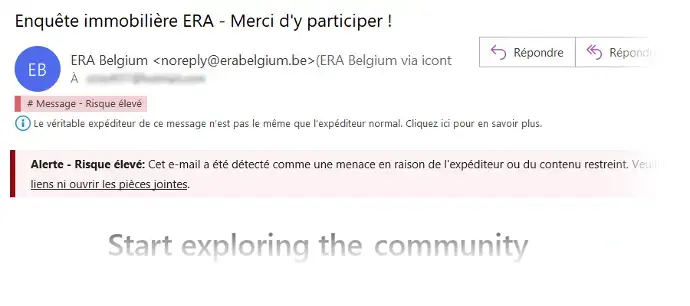
Preview of a customized banner
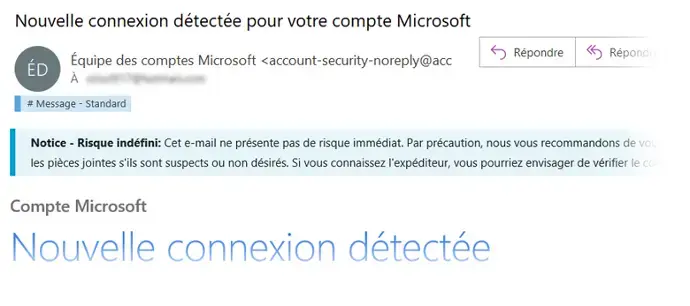
Preview of a customized banner
Phishing Addin
For your Microsoft Windows environment
This solution is perfectly suited for businesses using the classic version of Microsoft Outlook (from 2016 to 365) on Windows, regardless of their email platform (Microsoft Outlook, Gmail, Microsoft Exchange Server, Microsoft Exchange Online, etc.).
Advanced employee interaction to provide better guidance and simplify the reporting of suspicious emails.
Simplified deployment directly on client machines, with no need for advanced server infrastructure.
Local email analysis ensuring full control over sensitive data and enhanced confidentiality.
Contact-us to schedule a demo
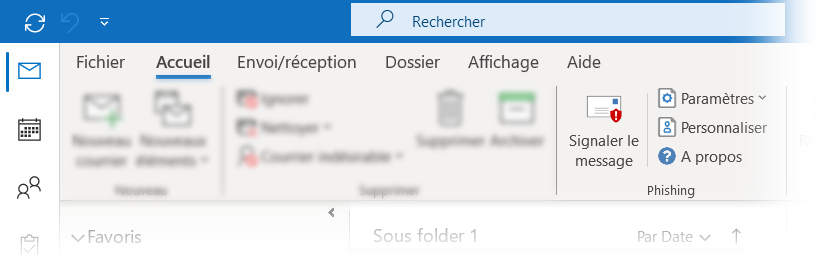
The reporting button indicates the risk level.
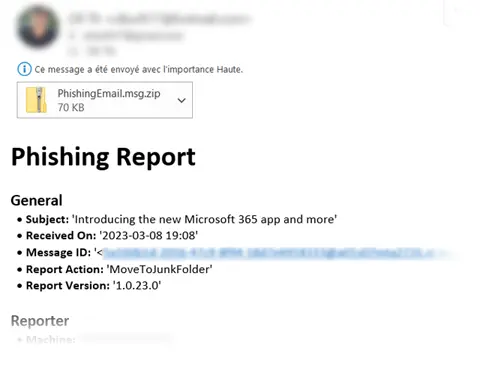
Report email sent to the IT team.
Detailed comparison
|
|
|
Phishing WebHook |
|
Phishing Addin |
|
Compatible email clients |
| | | |
Microsoft Outlook 365 on the web, Android et iOS | ✔ | ✖ | ||
|
Microsoft Outlook 2016 à 365 on Windows |
|
✔ |
|
✔ |
|
Compatible email providers |
|
|
|
|
|
Microsoft Office 365 (Outlook Online) |
|
✔ |
|
✔ |
Online providers other than Microsoft, such as Gmail | ✖ | ✔ | ||
Microsoft Exchange Server (on-premises) | ✖ | ✔ | ||
Solution deployment | ||||
On client machines | ✖ | ✔ | ||
On a local server (on-premises) or in the cloud | ✔ | ✖ | ||
Email analysis rules and threat detection | ||||
Classification into four levels: Unknown, Low, Potential, and High. | ✔ | ✔ | ||
Advanced analysis of email properties: addresses, subject, envelope, headers, URLs, attachments… | ✔ | ✔ | ||
Detection of impersonation attempts targeting members of your organization. | ✔ | ✔ | ||
Detection of homograph attacks (domains and other properties). | ✔ | ✔ | ||
Local email analysis without relying on an external service such as an SMTP relay. | ✔ | ✔ | ||
Email header banner | ||||
Risk level indication with a customized description of the threat. | ✔ | ✔ | ||
Preservation of preview and formatting. | ✔ | ✔ | ||
Adapts to each user’s language through multilingual support. | ✔ | ✔ | ||
Preventive actions on emails. | ||||
Execution of preventive actions on emails (deletion, relocation, etc.) based on the risk level. | ✔ | ✔ | ||
Phishing reporting | ||||
Reporting button with detailed report sent to administrators. | >>> | ✔ | ||
Automated email reporting with detailed reports sent to administrators. | >>> | ✔ | ||
Support for phishing simulation campaigns. | >>> | ✔ | ||
Email categorization | ||||
Assignment of a category based on the risk level. | >>> | ✔ |